Ascend
Results, and what other people are shown
A quiz → Results. You see everything about a quiz you made; the people taking it see only a summary, and only once it cannot be traced back to anyone.
Who can see results
A quiz's results name real people, so they are private. The person who created the quiz sees them, and so do the account's owners and admins. Anyone else on the project, including other publishers, sees Results are private to this quiz's creator in their place. They can still build and edit the quiz.
What you see
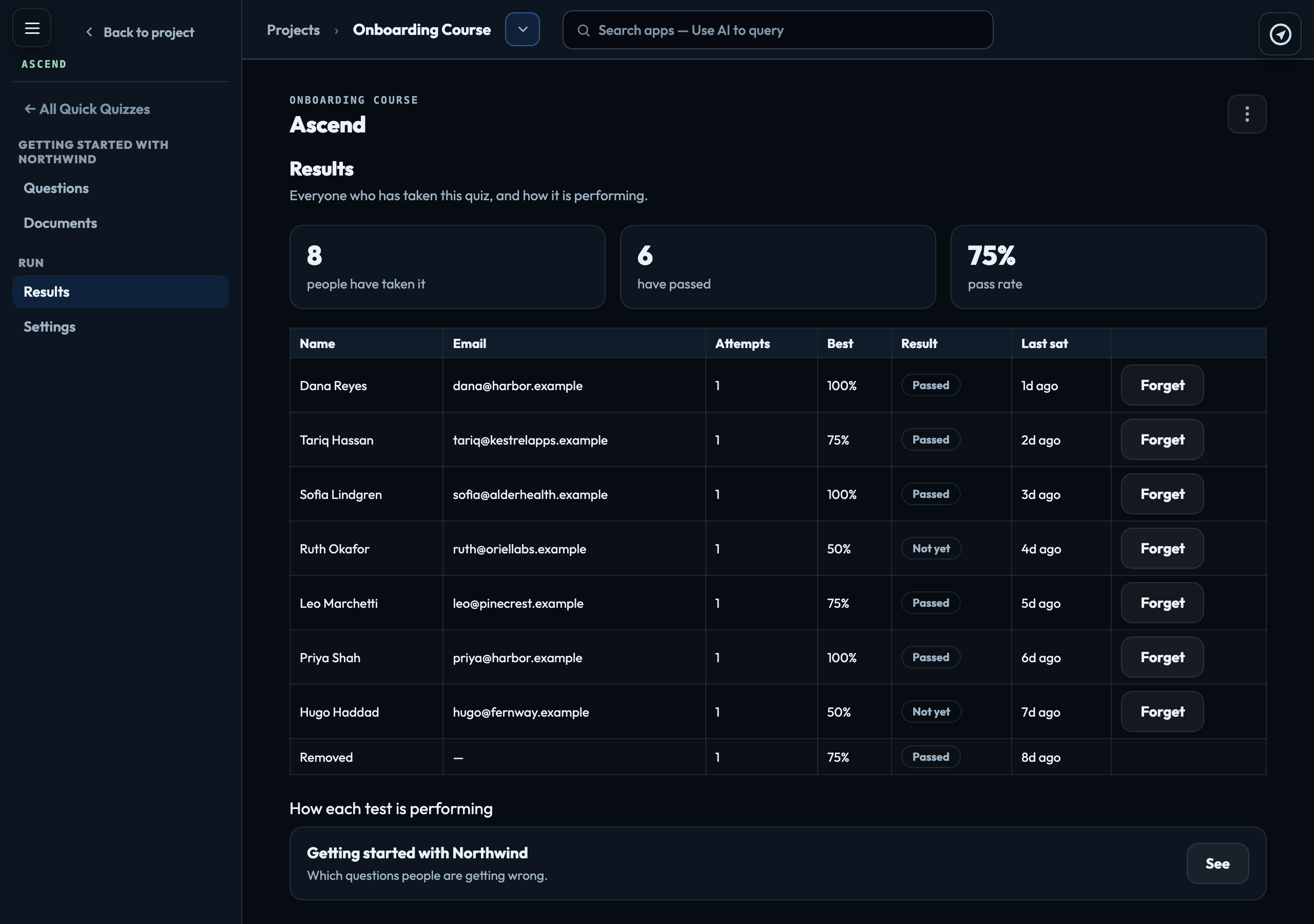
Results shows how many people have taken the quiz, how many passed and the pass rate, then everyone who has taken it: name, email, attempts, best score, Passed or Not yet, and when they last sat it.
Under How each test is performing, See opens the breakdown: how many people have sat it, the average, the median, the pass rate, how scores are spread, and question by question how many got each one right. That table is the useful one — a question everybody gets wrong is usually a badly written question, or one the documents do not answer clearly. A question nobody has answered yet shows a dash, not 0%.
Assigned from Thrive beside a name means the quiz was sent to them from a Thrive contact's record. Their score and whether they passed also appear on that contact's record — never their answers. Sending a quiz to a contact
What a taker sees about everyone else
With Show each person how everyone else did switched on, each result page shows the average, how scores are spread, and where they stand in plain words — "above two thirds of the people who have taken this" — rather than a percentile.
Nothing is shown until at least five other people have taken it. With fewer, an average plus your own score is enough to work out someone else's. Each person counts once, at their best attempt, so one person retaking many times cannot skew the figures. No taker is ever named to another, and no other person's score is ever shown.
Takers can see how many people got each question right, but never which option people chose — on most questions that would give the answer away. That appears only where you have chosen to show the right answers.
Removing someone
Forget on the Results list deletes that person's name and email, and their old result link stops working. Only an account owner or admin sees Forget: it cannot be undone, and it acts on someone else's personal data. Their score stays, anonymised, so the figures every other taker has already been shown do not change. The row then shows Removed. They can take the quiz again, as a new person.
Ascend also removes a taker's name and email automatically two years after they last started one of its tests, the same way: the score stays.
Signed in to VeraGen? Press Guide me on any screen for a walkthrough, or ask Odin.