Billing & credit
Statements
Account → Statements. A statement for every month that has ended, which you can open as a PDF. What this month has cost so far is on Billing.
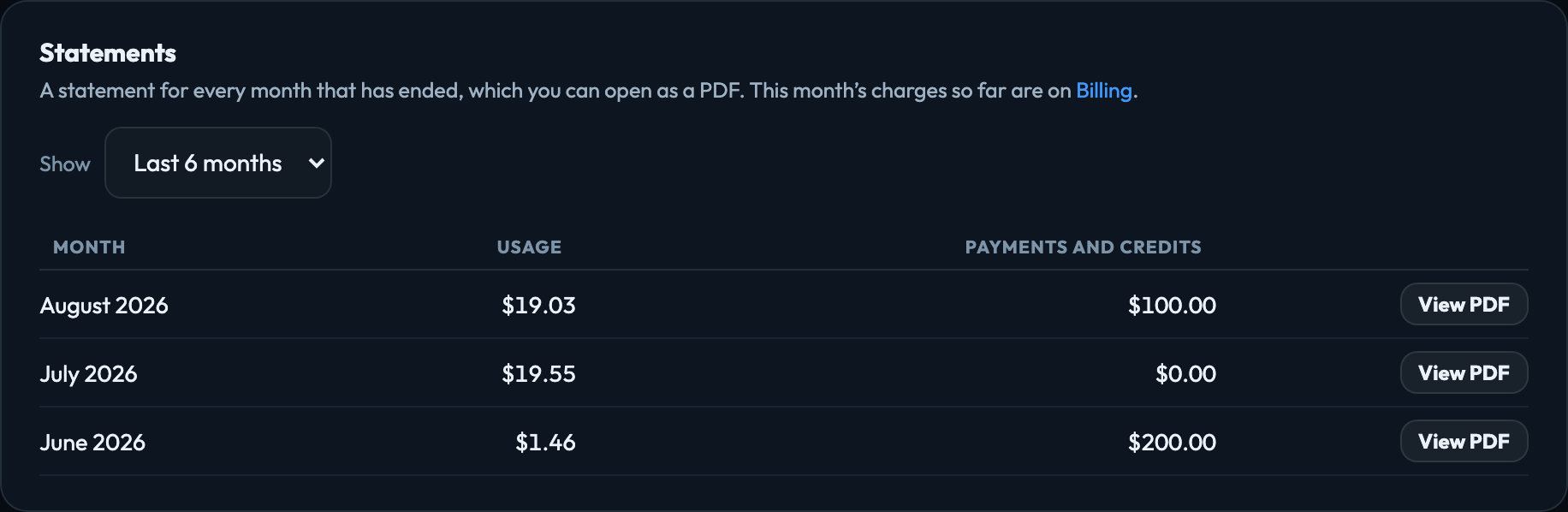
Finding a statement
The list opens on the last 6 months. To look further back, change Show to A year and pick the year, or to A month and pick the year and month. Each row has the month’s usage, its payments and credits, and View PDF.
When a statement is issued
Every month, at midnight on the 1st in the account owner’s timezone (their profile setting; UTC if none is set), the month that just ended is issued as a statement — even a month with nothing in it. Each statement starts exactly where the previous one ended, so no time is missed or counted twice, even if the owner’s timezone changes.
A statement is issued only once every day of its month has been charged. Compute for a day is charged just after that day ends, so the statement usually arrives a minute or two after midnight, with the month’s last day on it.
The owner, and every admin with billing access, gets an email that it is ready, with a link straight to it. If the account has a Billing email under Account → Settings, that address gets it too. The company details you enter there are printed at the top of each statement. An issued statement never changes: opening it again, later, shows exactly what was issued.
Occasionally a little compute from the end of a month is recorded only after that month’s statement was issued. Because an issued statement never changes, that time is charged on the next statement instead, listed under Compute as Includes late time from the day it was used.
There is no statement for the current month — it is still happening, and its charges so far are on Billing.
What a statement contains
| Summary | Opening balance, payments and credits, AI usage, service environment fees, and the closing balance. |
|---|---|
| AI Usage | Every app, one by one. Then each person’s usage with the apps it came from — including anyone who has since left, and Automations for scheduled work nobody started by hand — and every AI model used, with the tokens it read and wrote. Outside services an app paid for, such as X API reads, are listed with it. |
| Service Environment Fees | What the account’s environment costs to run whichever apps are used: Storage for the disk space your files and data occupy (in MB-days), and Compute for the processing time the hub spends working for your account — your team’s requests and your scheduled workflows — measured in GB-hours. Both are charged daily as they are used; there is no monthly fee. Compute is counted by day in the account owner’s timezone, and each day is on the statement for the month it belongs to. |
| Payments and credits | Card payments and automatic top-ups, each with the card that paid (for example Visa ending 4242), credit from VeraGen and any adjustments, each with its date. On a plan account this also lists the Free trial credit, each month's Included monthly AI usage, and Unused included usage expired (a negative line) when a month's included usage ran out unused. See Plans and the free trial. |
| Your plan | On a plan account, a line under the payments names the plan, how many people it bills for, and whether it is billed monthly or annually. The plan fee itself is on Stripe's invoice and receipt, not on the statement, because it is not part of the AI balance. |
For months before your account's balance history began, a statement shows every charge and payment but not the opening and closing balances.
Signed in to VeraGen? Press Guide me on any screen for a walkthrough, or ask Odin.