FOIA Gen
Writing a request
Press + New request on any FOIA Gen page, or Start a request with this agency on a Rules card. The request is written in five steps, shown across the top: Describe, Agency, Questions, Draft and Send. Your work is saved as a draft at every step; open it again from Requests.
Watch the video
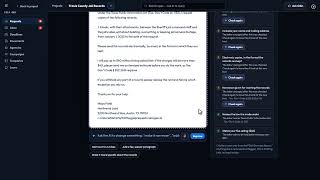 Writing and Sending a Request3:18 video
- Describe. Say what records you want, in your own words, for example Emails between the city manager and the police chief about the body-camera policy, 2024 to 2025. You can speak instead of typing.
- Agency. FOIA Gen suggests the kind of office that holds those records and lists matching agencies. Narrow the list with the filters if you need to, then press Choose on the right one. Finding the right agency
- Questions. FOIA Gen asks at most two short questions at a time: the date range, the kinds of records, whose records to search, the format, your fee limit and whether to ask for a fee waiver, and anything the agency's law requires (some states only answer their own residents). Why this matters explains each one. Skip, use your best judgement moves on, leaving any question you haven't answered to FOIA Gen; That's enough: write it now keeps the answers you've already picked or typed and goes straight to the draft.
- Draft. FOIA Gen writes the request to the agency's rules. Beside it, a checklist marks each requirement as met (✓), worth a look (!) or missing (✕); Fix it for me proposes a change for one item. The checklist follows the request as it is saved: when you apply a change or save your edits, the items FOIA Gen checks itself (the law named, your fee limit, fee waiver, faster processing and date range, residency or commercial use where the law asks) update straight away. Items the AI judged, such as whether the records are described clearly enough, show Check again once the text has changed; press it to have the AI look at the new text. Edit lets you change any word, Improve asks the AI for changes you describe, and Write it again starts the draft over. A proposed change is shown before it is applied; keep it or discard it.
- Send. Press Review and send. Sending a request
Legal citations in a draft come only from FOIA Gen's rules library. Anything else the AI writes as a citation is removed and flagged.
Fix every item marked ✕ before you send: a request that misses something the law requires can be refused or delayed.
Signed in to VeraGen? Press Guide me on any screen for a walkthrough, or ask Odin.