FOIA Gen
Sending a request
The Send step depends on how the agency takes requests, which its Rules card shows. Nothing goes out until you press the button yourself.
Watch the video
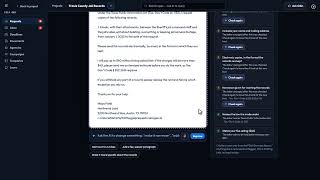 Writing and Sending a Request3:18 video
Email: FOIA Gen sends it for you
FOIA Gen shows who it goes to, the subject, and the address it is sent from. Every request is sent from its own address, so the agency's replies come straight back to the request.
If sending isn't switched on for your account, the Send step says so before you approve anything, and Send request stays off. Use Copy the request to send it from your own email, or Use the portal instead or Print a letter instead when the agency takes requests those ways too.
- Tick I wrote and approve this request, and the information about me in it is accurate. If you asked for faster processing, or the agency needs to know you won't use the records commercially, tick that too.
- Press Send request.
The request moves to Sent, its deadlines start, and a copy of exactly what was sent is kept in its History.
Portal: FOIA Gen guides you through it
Agency portals need your own account and a security check, so you submit there yourself.
- Press Open the portal. The agency's website opens in a new tab.
- Copy each field across with its Copy button.
- After you submit, type the tracking number the portal gives you and the date, then press I've submitted it.
Use your FOIA Gen inbox address as the email on your portal account, and the portal's own emails are filed with your request too. The FOIA Gen inbox
Mail only: FOIA Gen writes the letter
- Follow the steps shown: who the letter goes to, the address, what to enclose (proof that you may ask appears only where the law limits who may request), and whether it needs a signature, a notary or a fee.
- Press Print or save as PDF, sign it and post it.
- Back in FOIA Gen, enter the date you mailed it (and the certified-mail number, if you have one), then press I've mailed it.
FOIA Gen counts the deadlines from the day you mail it. The agency's own clock starts when the letter arrives, so its real deadline can be a few days later than the date FOIA Gen shows. Certified mail with a return receipt proves the day it arrived.
If something goes wrong
| Sending from FOIA Gen isn't switched on yet | Email sending isn't available for your account. The Send step shows this before you approve the request. Copy the request and send it yourself, or use the portal or mail steps. |
|---|---|
| This account has sent its 50 FOIA emails for this month | Requests, follow-ups and appeals all count. The limit resets on the 1st of the month (UTC). Ask VeraGen support if you need more. |
| We couldn't confirm this was sent | The email may or may not have reached the agency. Open the request and choose It was sent if you know it arrived, or Return to draft to send it again. FOIA Gen never sends it twice by itself. |
| It could not be sent. Nothing went out. | Try again in a few minutes. The request stays a draft. |
Signed in to VeraGen? Press Guide me on any screen for a walkthrough, or ask Odin.