Tellagent
Read feeds
The Read feeds block reads a project's RSS and Atom feeds, has the AI curate what they carry, and keeps what passes in the project's collection. It is a block in Tellagent's AI Workflows, so it runs on a schedule or when you press Run. Everything it reads is set up in the block itself.
Set it up
- In an AI workflow, add a Schedule trigger (for example every 15 minutes), then click Read feeds under Sources in the Blocks list and connect it after the trigger.
- Under Project, choose the project whose feeds it reads. A block added to a workflow starts with the workflow's project.
- Open Feeds, paste a feed's address under Add a feed, press Test it to see what it carries, then Add feed.
- Set the workflow to Active.
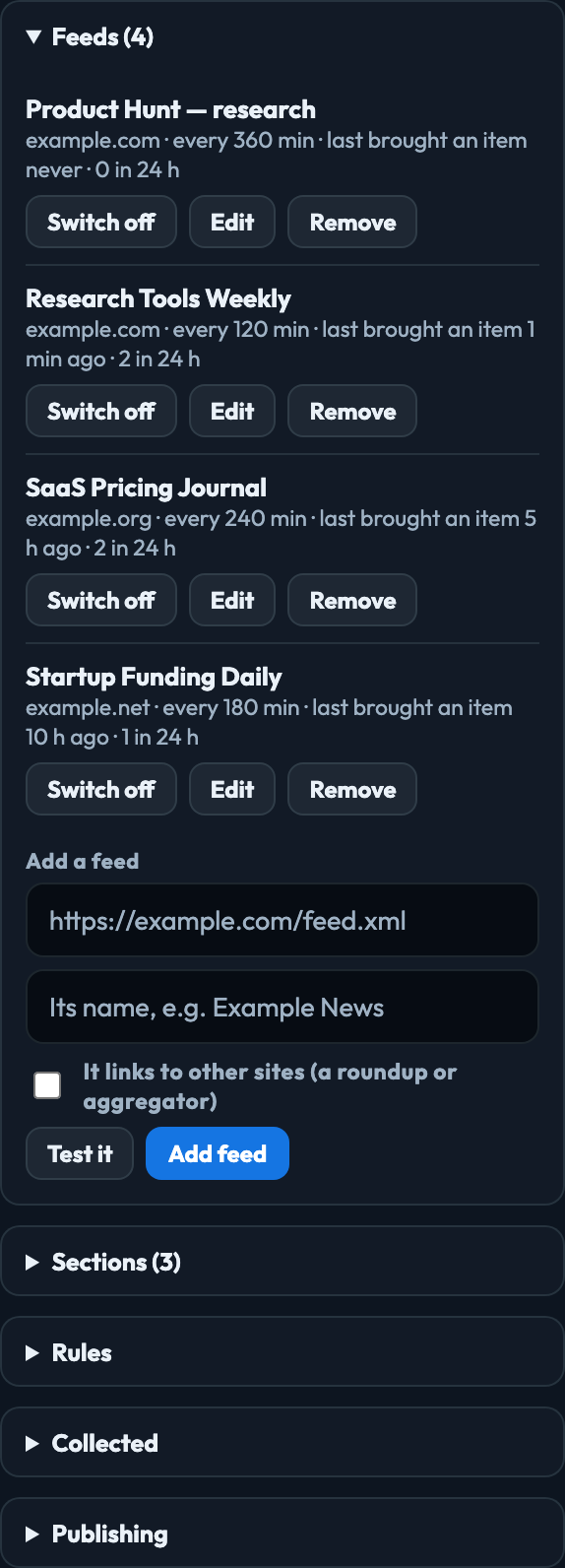
Each feed is read on its own schedule (Read it every, under Edit). A run reads up to Feeds per run of the feeds that are due; a run you watch has 24 seconds, so it reads at most 2.
What you set up in the block
| Feeds | The feeds it reads, with when each last brought an item in and how many it kept in the last 24 hours. Switch off stops reading one; Remove stops reading it and takes it off the list, and what it already collected stays. Edit sets its name, address, how often it is read, the sections it usually covers, whether it is a roundup that links to other sites, and a note about it for the curator. |
|---|---|
| Sections | What collected items are filed under. The curator picks one for each item. Hide leaves a section out of the published list of sections without deleting it; its items stay. |
| Rules | The lowest score an item may have, how old an item may be, whether new items go straight into the collection or Wait for someone to approve them, Curation instructions the curator reads before it decides, Other approved publishers, and the picture check. |
| Collected | What the block kept. Approve an item that is waiting, Pin one to the top, or Remove one from the collection (Restore puts it back). |
| Publishing | Puts the collection on the web for any website to read. Publish a collection |
Changes to feeds, sections and rules are saved as you make them and apply from the next run. Adding and changing feeds, sections and rules needs the publisher role or above. Roles
Which publishers it keeps
Each feed you add approves its own site. A roundup or aggregator feed links to other sites, so an item it links to is kept only when that site is under Other approved publishers. An item from a site on neither list is not kept, and taking a site off the list also takes the items already collected from it out of the published collection.
What it never keeps
Sexually explicit items, and violence described for shock rather than to report, are always dropped, whatever the instructions say. With the picture check on, each picture is looked at before its item is kept. These are the platform's rules and cannot be switched off.
What it costs
Curating uses AI credit, shown in Observability under Tellagent. The run's step shows how many feeds it read and how many items it kept; a run that finds nothing new is a success, not a failure. Run history
Feeds you already had
A project that had RSS & Atom Feeds has a workflow in its Tellagent named Read feeds: and the project's name, holding this block, with the project's feeds, sections and rules as they were. Switch it on to keep collecting. AI Workflows
Signed in to VeraGen? Press Guide me on any screen for a walkthrough, or ask Odin.