Chimp
QA: testing your website or app
QA checks the built website or app against its own spec before anyone outside your team sees it. It runs on a locked test machine, never on your live site. Open the app and click QA in the steps across the top.

> [!NOTE] > QA runs on the apps platform. Until it is connected, QA says it is waiting for the apps platform, and nothing is charged.
Run QA
Press Run QA (Run QA again after the first run). The first time, Chimp writes a test for every acceptance criterion in your spec. Then the run checks:
| Acceptance criteria | Each criterion is a browser test, run at phone, tablet and desktop sizes, along with the home page loading without errors. |
|---|---|
| Accessibility | Every page is checked for serious accessibility problems. |
| Fits every screen | No page scrolls sideways on a phone, a tablet or a desktop; a screenshot of each is kept. |
| Content and links | No placeholder text left behind, no broken images or links, and every image described. |
| Security | No secrets in the files, no form that sends to another site, no look-alike sign-in page, no redirect away, and the Report this site link on every page. |
| Speed and search | Speed, Accessibility, Best practices and Search (SEO) scores for the home page, each against its budget. |
It takes a few minutes. You can leave the page; the results and any bugs are there when you come back.
Bugs
Everything that fails becomes a bug in the project's Skunk Works: how bad it is, the steps to reproduce it, what was expected and what happened, the failing check, the story it breaks, and a screenshot. The same failure in a later run is added to the same bug, never filed twice. When a check passes again, its bug is closed as fixed. Closing or reopening a bug in Skunk Works does the same in QA.
The fix loop
When a run fails, the AI engineer fixes the bugs QA found and QA runs again by itself when the fix is built. It gets up to three rounds; owners and admins can choose fewer (down to none) under Fix rounds on Checks. When the rounds are used up, Chimp stops, says so, and assigns the open bugs to the person who started the app. Fix them, then press Run QA again.
Bugs reported by testers, and criteria marked It does not, are not fixed automatically: they wait for a person.
The tabs
| Checks | The latest run, the fix loop, the bugs, and The QA gate. |
|---|---|
| Staging | A private copy of the build for your team, and the people you invite to test it. See People testing, below. |
| Report | One run in full: each acceptance criterion with a pass or fail, the scores against their budgets, every check, the bugs by severity, screenshots and simulated customers. Choose another run from Run. |
| Tests | The tests, written as steps, and the criteria only a person can check (such as "the confirmation email arrives within a minute"). For those, try it and press It works or It does not; It does not files a bug. Rewrite from the spec writes the tests again after the spec changes. |
Try it as customers (on Checks, after a run) has simulated customers from your spec's audiences try the main tasks, and says where they got stuck.
The AI box at the top, Ask about a failure, or ask to run the checks again…, answers questions about the run, such as "Why did the booking test fail?", and can offer to run QA again.
People testing
On Staging, Open staging shows your team the build QA tests. It is locked to the people you invite, and the link lasts half an hour.
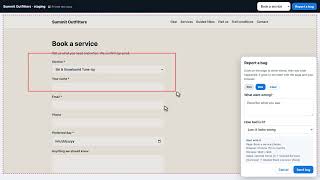
Under Testers, add email addresses and press Send invitations: each person gets a private link by email, with no account needed. They try the app, press Report a bug, draw on the page to show where, say what went wrong and how bad it is, and press Send bug. It becomes a Skunk Works bug with their drawing, the page, their browser and window size, and the pages they went through. A bug marked High blocks approval until it is fixed. Remove stops a tester's link working at once. An app can have up to 25 testers.
Approving QA
QA can be approved when every part of The QA gate is green:
- QA has run.
- Every acceptance criterion passes.
- Every criterion a person checks is confirmed.
- The scores meet the budget.
- No blocker or critical bug is open.
Minor and major bugs may stay open; the release notes list them. Owners and admins approve, with Approve QA and continue at the foot of Checks. Then Release opens. See Release.
Signed in to VeraGen? Press Guide me on any screen for a walkthrough, or ask Odin.